Text Blaze vs TextExpander: Which is Better in 2026?
Learn how Text Blaze compares to TextExpander and decide which one is the best overall text expansion tool in 2026.

Text Blaze and TextExpander both replace an abbreviation with saved text. Text Blaze does a better job in automating the entire workflow that gets you the perfect message - it can collect information from various sources, apply business logic, and catch mistakes. Text Blaze can also automate the next step after inserting the text. TextExpander stays closer to conventional text expansion, but also offers macOS scripting.
Text Blaze vs TextExpander at a glance
| Category | Text Blaze | TextExpander |
|---|---|---|
| Best fit | Standardizing complete workflows, from collecting information through taking the next action | Reusable text libraries and macOS automation with AppleScript or shell scripts |
| Forms | Text Blaze forms include text fields, paragraphs, drop-down menus, toggles, date pickers, linked fields, and formulas | Single-line and multiline fields, same-named fields of the same type that stay synchronized, popup menus, date pickers, and optional sections |
| Validation | Rules can display a specific error and block insertion until the information meets the required conditions | Ordinary fill-ins do not validate answers or block expansion based on a rule; comparable checks require a script |
| Conditional content | A rule can show, hide, or change content based on a form answer, calculation, webpage value, Data Blaze record, API result, or another supported condition | Conditional Sections branch on drop-down selections and can be nested; conditions based on separate fill-in fields require JavaScript, while webpage information must be supplied separately |
| Interactive interface | Dynamic tables plus beta buttons and code blocks can display data and run logic while the form is open | Rich-text tables plus a fill-in window with fields, popup menus, date pickers, and optional sections |
| Snippet logic | Built-in code blocks work with form answers, tables, Text Blaze commands, and connected data | JavaScript Snippets can calculate, transform information, and generate the final text |
| Local-computer automation | No equivalent to arbitrary AppleScript or shell commands | On macOS, AppleScript can control applications and shell scripts can run command-line tools |
| Read open webpages | The Chrome extension can use information from any open webpage | No comparable built-in webpage reader |
| Data layer | Data Blaze is a built-in spreadsheet/database that snippets can read from and write back to | No built-in database; clipboard content and custom scripts can supply data |
| Outside services | Application programming interface (API) calls can retrieve information or update another service | Custom scripts can connect to services supported by the script and local environment |
| Follow-up actions | Autopilot can click controls, press keys, switch tabs, and continue the workflow; APIs can write to other systems | Key-press macros can tab through fields or submit a form; cursor macros handle arrow movement; AppleScript can automate scriptable Mac applications |
| Artificial intelligence | AI Write helps build snippets in the editor; the separate AI Blaze extension drafts and rewrites text using webpage context | AI Recommendations finds saved Snippets; a connection for compatible AI assistants can create, search, and update the Snippet library |
| Team management | Share and assign approved workflows, review changes and comments, manage access, and measure use by snippet, team, or person | Share approved Snippets, manage requests and permissions, and review organization statistics and change history |
| Administration | Centralized roles, teams, default folders, user properties, and a Business-plan user-management API | Group permissions, Business/Enterprise Snippet Requests, and plan-based statistics and activity history |
| Enterprise controls | Single sign-on, automated user provisioning, event audit logs, and bespoke reports | Single sign-on, automated user provisioning, customized reports, and unlimited activity history |
| Desktop and browser | Chrome, Edge, Windows, and macOS | Chrome, Edge, Windows, and macOS |
| Mobile | Run a snippet in the mobile dashboard, then copy its output into another app | iPhone, iPad, and Android apps are labeled early access |
| Free access | Free forever with 20 active snippets and unlimited basic use; five total daily insertions of snippets containing Pro features | Free forever with five active Snippets and one Snippet swap every two weeks |
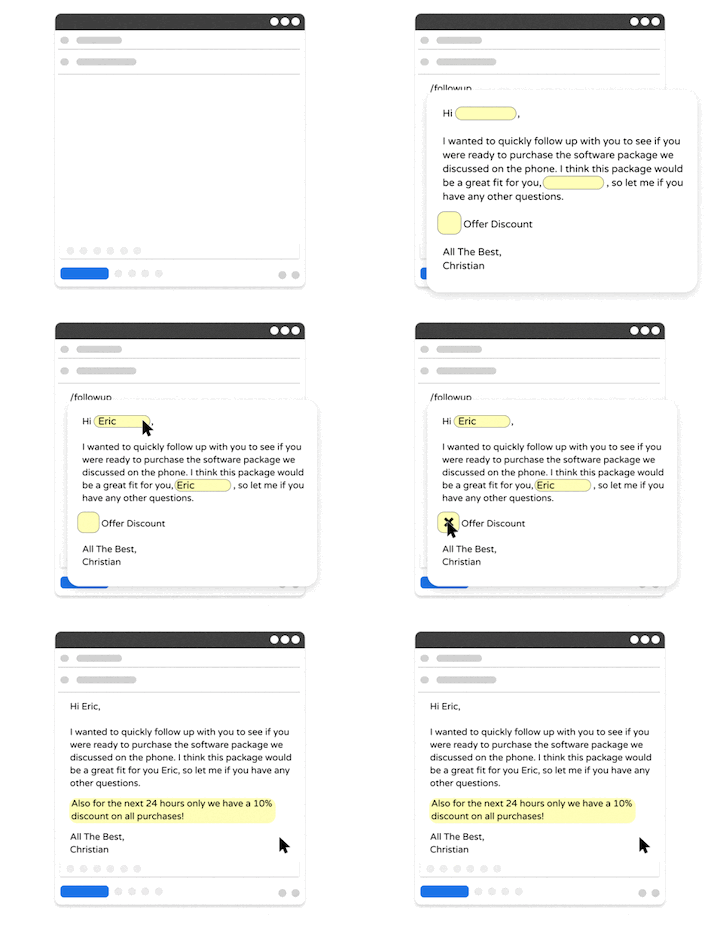
Looking for a free text expander that works anywhere?
Join over 800,000+ others who are using Text Blaze templates.
How popular are Text Blaze and TextExpander?
The Text Blaze Chrome Web Store listing shows more than 800,000+ users, a 4.9-star average, and about 1,900 ratings. The TextExpander Chrome listing shows 100,000 users, a 4.5-star average, and 133 ratings. These are extension figures, not each product's total customer count.
G2's Text Blaze and TextExpander comparison rates Text Blaze at 4.9 and TextExpander at 4.8. TextExpander has more G2 reviews; Text Blaze has the larger Chrome user and rating samples.
What can Text Blaze and TextExpander both do?
Text Blaze and TextExpander can both expand a shortcut into formatted text, links, images, dates, clipboard contents, or a template with blank fields. Both can place one reusable snippet inside another and search saved snippets by name, abbreviation, or content.
Text Blaze includes those basic jobs, but it does not stop at filling blanks in prepared text. A Text Blaze snippet can use an answer or information from the webpage to change the questions, calculate a result, select the right language, block a mistake, and complete the next browser action.
TextExpander adds suggested snippets, published autocorrect groups, and applications in eight languages. Those conveniences support traditional expansion. For a simple shortcut such as /addr, either product works. Text Blaze pulls ahead when the shortcut must carry out a business rule or finish part of the process.
Which product has better forms and workflow automation?
Text Blaze and TextExpander can both link repeated fields by name, so entering the customer's name once fills every copy. Text Blaze can then use an answer to change the next question, recalculate an amount, swap whole paragraphs, or stop an invalid decision before it leaves the form. TextExpander fill-ins primarily customize the text before it expands.
Consider a customer asking for a refund. The employee handling the ticket needs to identify the transaction, check the reason and amount against policy, insert the approved response, and either close the ticket or send it for review.
| Refund step | Text Blaze | TextExpander |
|---|---|---|
| Identify the transaction | Read the customer and recent transactions from any open webpage in Chrome, another system through an API, or Data Blaze | Type or paste the details into fill-ins |
| Collect the request | Show fields, drop-down menus, toggles, or a table | Show fields, drop-down menus, date pickers, optional sections, and conditional sections |
| Apply refund policy | Compare the reason, amount, account state, and other data against shared rules | Ask the employee to select the correct branch or encode the policy in JavaScript |
| Catch mistakes | Require fields, display a specific error, and block insertion until the problem is fixed | Check the completed form manually or add a script |
| Produce the answer | Insert the approval or rejection language and calculated details | Insert selected values and manually included sections, or generate the answer with a script |
| Finish the ticket | Use Autopilot to click the next control or continue on another tab; record the decision in another system automatically | Use key-press macros to move through predictable fields or submit the form; write a macOS script for more complex application automation |
With Text Blaze, typing /refund can display the customer's recent transactions, ask why the refund was requested, compare the amount and reason with policy, and refuse to insert an answer until the required information is present. The snippet can then write the approval or rejection, update the ticket automatically when the ticketing system provides an application programming interface (API), and move the employee to the next task.
Want to ensure your messages are compliant?
Use Text Blaze to enforce refund policy in every response.
Text Blaze rules can change the form, response, and next step
A Text Blaze {if} rule can use a form answer, calculation, webpage value, Data Blaze record, or API result to decide what the employee sees and what the snippet does next. In the refund workflow, choosing "duplicate charge" can reveal the matching transaction, while the amount determines whether the response approves the refund or sends it for review.
TextExpander conditional sections are available on paid plans. They let one Snippet contain several versions of a message. The employee chooses a branch from a drop-down menu, and only that branch is inserted. One selection can reveal another menu, so choosing "billing" could reveal "duplicate charge" and "wrong amount."
That menu choice controls the TextExpander branch. A calculation cannot choose it automatically. JavaScript can calculate and branch on values from separate fill-in fields, but it cannot directly read the visible contents of an open webpage. Page information still has to come from manual entry, the clipboard, or separate local automation.
Validation prevents incomplete work from leaving the form
Text Blaze calls these checks validation. The snippet can display a specific error and refuse to insert until a required name is present, an amount falls inside the allowed range, or a combination of answers makes sense.
A healthcare template can stop when required patient details are missing. A financial-services workflow can prevent an employee from approving an amount above a defined limit. TextExpander Conditional Sections can guide the employee to a selected branch, but checking the amount and blocking an invalid expansion requires JavaScript.
Dr. Evelyn Duvivier uses Text Blaze menus, rules, and blocking errors in telehealth snippets. Her Text Blaze case study reports 87,959 snippet uses and 887 hours saved since 2021. As she explains, "Text Blaze allows me the time to provide a deeper and more thoughtful level of care."
Tables and buttons give the form a working interface
Text Blaze tables can contain form fields, formulas, rules, repeated rows, and information returned from Data Blaze. A refund workflow could display the customer's recent transactions as rows, calculate totals, and hide records that do not qualify. Table support depends on the application receiving the final expansion; unsupported destinations remove the table.
Text Blaze buttons and code blocks add controls to the form itself. A button can refresh customer data, add or remove a line item, validate a calculation, or update a Data Blaze record before the snippet is inserted. Buttons remain part of the interactive form rather than the final pasted text.
How do Text Blaze code blocks compare with TextExpander scripts?
Both products can run code, but they use code for different purposes. Text Blaze code blocks extend an interactive snippet. TextExpander script Snippets run JavaScript, AppleScript, or a shell script and expand the text returned by that code.
Text Blaze code blocks support variables, conditions, loops, reusable functions, error handling, and many Text Blaze commands. A block can run once when the snippet opens or when the user clicks a button. Because the code remains inside the same dynamic snippet, it can work directly with form fields, rules, tables, Data Blaze, and connected commands.
TextExpander's JavaScript Snippets are more flexible than ordinary fill-ins. JavaScript can read named field values, transform clipboard text, perform calculations, adjust dates, and generate the final expansion. The author has to write and maintain that logic as code.
TextExpander retains a real advantage for macOS automation. AppleScript and shell-script Snippets can request information from local applications or run command-line tools. Text Blaze code blocks do not replace arbitrary local OS scripts. Their advantage is making code part of a cross-platform, interactive Text Blaze workflow.
How can Text Blaze use webpage, API, and Data Blaze information?
Text Blaze can read any open webpage, retrieve or update information through an API, and keep shared records in Data Blaze.
Read information already on the webpage
The Text Blaze Chrome extension's {site} command can read a customer's name, account type, ticket number, transaction amount, or other visible information from any open webpage. The snippet can insert that value, place it into a form field, calculate with it, or test it against a rule.
An ordinary TextExpander Snippet cannot pull visible information from an open webpage. The user must type the information, copy it to the clipboard, or obtain it with custom code.
Update the systems your team already uses
Text Blaze can look up information and record the finished work without making an employee enter the same details twice. Its API commands can check an order or account limit, create a customer relationship management record, or update a ticket after the required information and policy checks pass.
TextExpander scripts can make connections supported by their language and runtime, but TextExpander does not provide the same built-in visual API layer for a normal rich-text Snippet.
Use Data Blaze as the workflow's data layer
Data Blaze is Text Blaze's built-in spreadsheet/database. A snippet can select records, add new rows, update existing data, or delete records. The information stays in a shared table instead of being hard-coded into every snippet.
A compliance team can maintain client records and filing dates in Data Blaze, then use the same information in documents, emails, and online forms. In a Text Blaze compliance case study, Pratik Shah explains the benefit: "I can avoid the duplication of my work by using the information which is stored in Data Blaze."
Can either product finish the next step?
Text Blaze can continue working after it has assembled the text. Autopilot can press keys, pause, click webpage controls, switch tabs, and continue the workflow on another page. It can select a status or queue by clicking the appropriate control. The {click} command does not type a value itself, but it can focus a field so the snippet text that follows is inserted there. API commands can write ticket data to another service directly.
TextExpander key-press macros can press Tab, Enter, Return, or Escape during expansion. That works when the fields stay in a predictable order. AppleScript can automate supported Mac applications, but it requires code and does not transfer to Windows. TextExpander does not include a comparable built-in browser-action layer for clicking controls, waiting on a page, or switching tabs.
Cash App has used Text Blaze with thousands of support representatives since 2020. In its Text Blaze case study, Text Blaze coordinator Karissa Fiorentino explains how the company used snippets to guide escalation and transfer decisions: "Text Blaze helped us create a decision tree structure that leads support reps through each important benchmark in our workflows."
Cash App reported an 85% positive response from employees, fewer misrouted cases, and 100% process adherence when the pilot snippets were used correctly.
Can you start with ready-made snippets?
Both products provide reusable examples, but Text Blaze can package the workflow and its shared records together. The Text Blaze Marketplace contains free and paid templates reviewed by the Text Blaze team. A template can include a complete folder of snippets and the connected Data Blaze tables. Users can copy the package and adapt it to their own process.
The Text Blaze Community is useful for smaller examples. Members post working snippets that another user can inspect, copy into the Text Blaze dashboard, and adapt. The Marketplace is the better starting point for a reviewed multi-snippet workflow; the Community is where users exchange individual solutions and get help.
TextExpander's Public Groups and Snippet Templates provide shared collections of ready-made Snippets. Public Groups can stay connected to the publisher's updates, while Snippet Templates create editable copies.
Copy a ready-made Text Blaze workflow instead of starting from zero
Which product is better for date math?
Both Text Blaze and TextExpander can insert today's date or a date a set number of days later. Text Blaze becomes more capable when a user chooses the starting date, several deadlines depend on it, or the calculation must skip weekends and change other parts of the snippet.
Adding days, weeks, or months to a date
Text Blaze adds the change to the specific {time} command that produces each date. A snippet can insert today, 15 days from today, and the end of next month without one calculation changing another date by accident.
TextExpander's Date Math macros change the date used by every date command that follows until the snippet reaches a Reset Adjustment. That is convenient when several dates need the same change, but a missing reset can also alter dates that were supposed to stay untouched.
Calculating from a date chosen in the form
Text Blaze can name a {formdate} field and use that selected date as the starting point for other calculations. A June 3 appointment can produce a June 10 check-in, a July 3 documentation review, and a December 3 recall reminder.
TextExpander has a Date Picker Fill-in, but its standard Date Math controls do not bind subsequent calculations to the date selected in that field. A JavaScript Snippet can perform the calculation.
Weekdays, date differences, and rules
Text Blaze can skip named weekdays, calculate the difference between two dates, find calendar boundaries, and use the result in a conditional rule. For example, a follow-up can be scheduled 10 weekdays after intake, then a warning can appear if the chosen review date falls outside the permitted interval.
TextExpander can handle those jobs with JavaScript. Its standard Date Math controls do not provide weekday skipping, date-difference functions, or date-based branching. Neither product provides a universal holiday-aware business calendar without additional data or code.
How do Text Blaze's and TextExpander's AI features compare?
Text Blaze offers two kinds of AI help. AI Write builds snippets inside the Text Blaze editor. The separate AI Blaze extension can draft new text using the current webpage for context. TextExpander uses AI Recommendations to retrieve approved Snippets and a Model Context Protocol connection to let outside AI assistants create or manage them.
TextExpander AI Recommendations examines the text around the cursor in Chrome and suggests relevant Snippets from the user's library. It runs locally with Google's Gemini Nano model and does not rewrite the approved Snippet. TextExpander also provides a Model Context Protocol server, a connection that lets compatible assistants such as Claude, ChatGPT, or Microsoft Copilot search Snippets, create Snippets and Groups, and update existing Snippets under the user's permissions.
Text Blaze AI Write works inside the snippet editor. A user can describe a template and ask AI Write to draft the wording, add form fields, or help construct Text Blaze commands. It is an authoring tool for the snippet itself.
AI Blaze is a separate Chrome extension. It can write, rewrite, summarize, and translate using information from the current webpage as context. AI Blaze does not turn every Text Blaze snippet into a generative prompt. The two products can be used together, but they remain separate tools.
Where do Text Blaze and TextExpander work?
Desktop coverage is similar. Both products work in Chrome, Windows, and macOS, and both can perform core text expansion offline. Online editing, synchronization, APIs, cloud AI, and cloud data still require a connection.
Text Blaze works offline through Chrome and its Windows and macOS desktop apps. The main platform difference is webpage reading: the {site} command requires the Chrome extension. Text Blaze does not have a system-wide iPhone, iPad, or Android keyboard app. Its mobile dashboard can run a snippet: visit the dashboard on a phone, type the shortcut, and copy the generated text into the destination app.
TextExpander labels its iPhone, iPad, and Android apps as early access, so mobile is not a clear reason to choose it. Text Blaze's dashboard does less than a system-wide keyboard: it generates the snippet on a phone for the user to copy into another app. TextExpander's clearer platform advantage remains AppleScript and shell-script automation on macOS.
Which product is better for teams, administration, and analytics?
Text Blaze is better for teams standardizing decisions and follow-up work alongside approved wording. Both distribute shared text and control access. Text Blaze connects templates to policy checks, live data, page actions, and workflow reporting.
Text Blaze Business includes shared folders, folder roles, default folders, teams, user properties, centralized administration, and organization analytics. Teams can review a snippet's change history, discuss it in comment threads, see use over time, identify top snippets, and review activity by team or person. A user-management API lets administrators add or remove members, manage teams, and configure member properties programmatically.
Text Blaze Enterprise adds Security Assertion Markup Language (SAML) single sign-on, System for Cross-domain Identity Management (SCIM) user provisioning, event audit logs, and bespoke reports. SAML lets employees sign in through the organization's identity provider. SCIM automates adding, updating, and removing users as their employment status changes.
TextExpander organizes shared content into Groups with permissions. Business and Enterprise include Snippet Requests; organization statistics and activity-history depth vary by plan. Enterprise also supports single sign-on, SCIM provisioning, and customized reporting.
Text Blaze's standard dashboard reports use by snippet, team, and person. A snippet can also log the ticket number, selected refund reason, decision, review path, or other workflow data into Data Blaze. The organization can join those records with customer-satisfaction, handle-time, or error data from another system. Cash App used Data Blaze for custom reporting that tracked actions inside snippets, adoption, and workflow blockers. Teams can then compare snippet use with handle time, error rates, or another business outcome.
TextExpander's usage reports measure adoption through time saved, expansions, and frequently used Snippets; its separate Snippet Activity history records changes. Text Blaze can measure the same usage activity and capture the business context surrounding each use.
How do security and compliance compare?
Both products support regulated organizations. Certifications cover only part of the review; plan terms and data handling determine whether a specific deployment fits the organization's requirements.
Text Blaze is System and Organization Controls (SOC) 2 Type II compliant and is audited by a third party; organizations can request the report. Text Blaze encrypts data in transit and at rest, is Health Insurance Portability and Accountability Act (HIPAA) compliant, and offers Business Associate Agreements to Enterprise customers. The Text Blaze HIPAA guide explains how forms handle one-time information locally and advises organizations to review deployments with their legal and risk teams.
TextExpander's security information lists SOC 2 and SOC 3 certifications, 256-bit Advanced Encryption Standard (AES-256) encryption at rest, Transport Layer Security (TLS) 1.2 or later in transit, HIPAA compliance, and Business Associate Agreement availability.
A regulated team should review what the workflow stores and transmits before deployment, including snippet content, form handling, connected services, AI features, permissions, logs, and the applicable contract.
Text Blaze vs TextExpander pricing
Text Blaze is less expensive on directly comparable paid plans and includes forms, checks that block incomplete work, connected data, and browser automation. Both products offer permanent free plans. The Text Blaze plans page and TextExpander pricing page list the following US prices; annual plans are paid up front.
Text Blaze vs TextExpander
| Plan | Text Blaze | TextExpander |
|---|---|---|
| Free access | Free forever; 20 active snippets; unlimited basic use; five total daily insertions with Pro features | Free forever; five active Snippets and one swap every two weeks |
| Individual, monthly billing | Pro: $3.49/month | Pro: $6/month |
| Individual, annual billing | $35.88/year | $60/year |
| Team, monthly billing | Business: $8.39/user/month | Business: $12/user/month |
| Team, annual billing | $83.88/user/year | $120/user/year |
| Enterprise | Custom pricing | Custom pricing |
At the published annual rates, Text Blaze Pro costs $24.12 less per year, about 40% below TextExpander Pro. Text Blaze Business costs $36.12 less per user per year, about 30% below TextExpander Business. Regional prices and taxes may differ.
Text Blaze combines the lower published price with more built-in workflow automation. It can remove work that TextExpander leaves to the user or a custom script: re-entering page data, checking policy, validating the answer, and completing follow-up steps.
Basic Text Blaze snippets have no daily limit, but the workflow in this article uses Pro features such as full forms, rules, formulas, webpage reading, and API commands. A free account can insert snippets containing those features five times total per day across all such snippets. That is enough to test the workflow, not run it throughout a workday.
Can Text Blaze import TextExpander Snippets?
Yes. The Text Blaze importer copies TextExpander Snippets into Text Blaze. It does not delete or disable the original TextExpander library, so the team can continue using TextExpander while checking the new copies. Formatted text should keep its formatting, and basic text fill-ins become Text Blaze form text fields.
Plain-text, formatted, and basic text-fill-in Snippets should require little rebuilding. TextExpander Conditional Sections, JavaScript, AppleScript, shell scripts, and TextExpander-only date or keyboard codes use different behavior or commands. Check those copies and rebuild the behavior with Text Blaze commands or code blocks when necessary.
After importing a response, Text Blaze can add required-field and policy checks, webpage information, database records, and follow-up actions that were not part of the original TextExpander Snippet.
Should you choose Text Blaze or TextExpander?
For most individuals and teams, Text Blaze wins this comparison. It costs less, has the more generous free plan, and can use one shortcut to collect information, apply policy, prevent errors, insert approved language, and complete the next action.
Choose TextExpander when AppleScript, shell scripts, or other macOS automation is essential to the current process. JavaScript Snippets are also capable, although Text Blaze code blocks cover similar snippet logic while remaining connected to Text Blaze forms, tables, rules, and data.
TextExpander is excellent at inserting an approved response. Text Blaze also handles the decision and the work that follows.
Import TextExpander snippets and automate the work around them with Text Blaze Pro
Frequently asked questions
What is the biggest difference between Text Blaze and TextExpander?
TextExpander focuses on storing, finding, sharing, and expanding reusable text, with scripts available for coded workflows. Text Blaze combines text expansion with forms, calculations, error checks, webpage information, Data Blaze, APIs, buttons, and Autopilot. Those parts can operate together inside one guided workflow.
Does Text Blaze have an equivalent to TextExpander JavaScript Snippets?
Text Blaze code blocks provide variables, conditions, loops, functions, and error handling inside dynamic snippets. They are the closest built-in equivalent for snippet logic, but they are not identical to arbitrary local scripts. TextExpander retains an advantage for AppleScript, shell commands, and other macOS automation.
Is Text Blaze free?
Yes. Text Blaze has a permanent free plan with 20 active snippets and unlimited use of basic snippets. A free account can insert snippets containing Pro features five times total per day. Pro removes that daily test limit and adds full forms, images, tables, conditional rules, and other advanced features.
Does TextExpander have a free version?
Yes. TextExpander now has a permanent free plan with five active Snippets and one Snippet swap every two weeks. Paid plans remove those limits and add more dynamic-content, collaboration, reporting, and administration features.
Do Text Blaze and TextExpander work offline?
Yes. Text Blaze works offline in Chrome, Windows, and macOS. TextExpander's core desktop expansion also works offline. Features that depend on synchronization, APIs, cloud data, or cloud AI require internet access.
Does TextExpander work on mobile?
TextExpander labels its iPhone, iPad, and Android apps as early access. Text Blaze can generate snippets through its mobile dashboard for copying into another app, but it does not provide system-wide mobile expansion.
Can Text Blaze read information from a webpage?
Yes. The Text Blaze Chrome extension can read information from an open webpage and use it in text, form fields, formulas, or rules. The Text Blaze desktop apps and ordinary TextExpander Snippets do not provide this capability.
Can Text Blaze import TextExpander Snippets?
Yes. Importing creates a copy in Text Blaze while leaving the TextExpander library intact. Formatting should remain, and basic text fill-ins become Text Blaze form text fields. Conditional Sections, JavaScript, AppleScript, shell scripts, and TextExpander-only date or keyboard codes may require testing or rebuilding.
Which one is best? Text Blaze or TextExpander?
For most people and teams, Text Blaze is the better choice. It costs less on directly comparable paid plans, offers a more generous free plan, and handles work that TextExpander leaves to manual steps or custom code. One shortcut can pull transaction details from the screen, check the request against refund policy, stop an incomplete or invalid decision, insert the approved response, record the result in the ticket, and move the employee to the next step.
TextExpander is a good fit for work built around macOS scripts. Its AppleScript and shell-script Snippets can control Mac applications or run command-line tools, which Text Blaze code blocks are not designed to replace. Both products handle conventional text expansion well. Text Blaze goes further with rules that change the workflow as answers or data change, plus checks that prevent incomplete or invalid work from being inserted.