

OASIS-E Cheat Sheet & Phrase Pack

Eliminate repetitive typing and mistakes. Insert an OASIS start of care narrative or homebound statement in any text box in seconds.

Free forever. Works in any web-based EHR or app. No integration required.

4.9 · 1,900+ Chrome Web Store reviews · 800,000+ people use Text Blaze

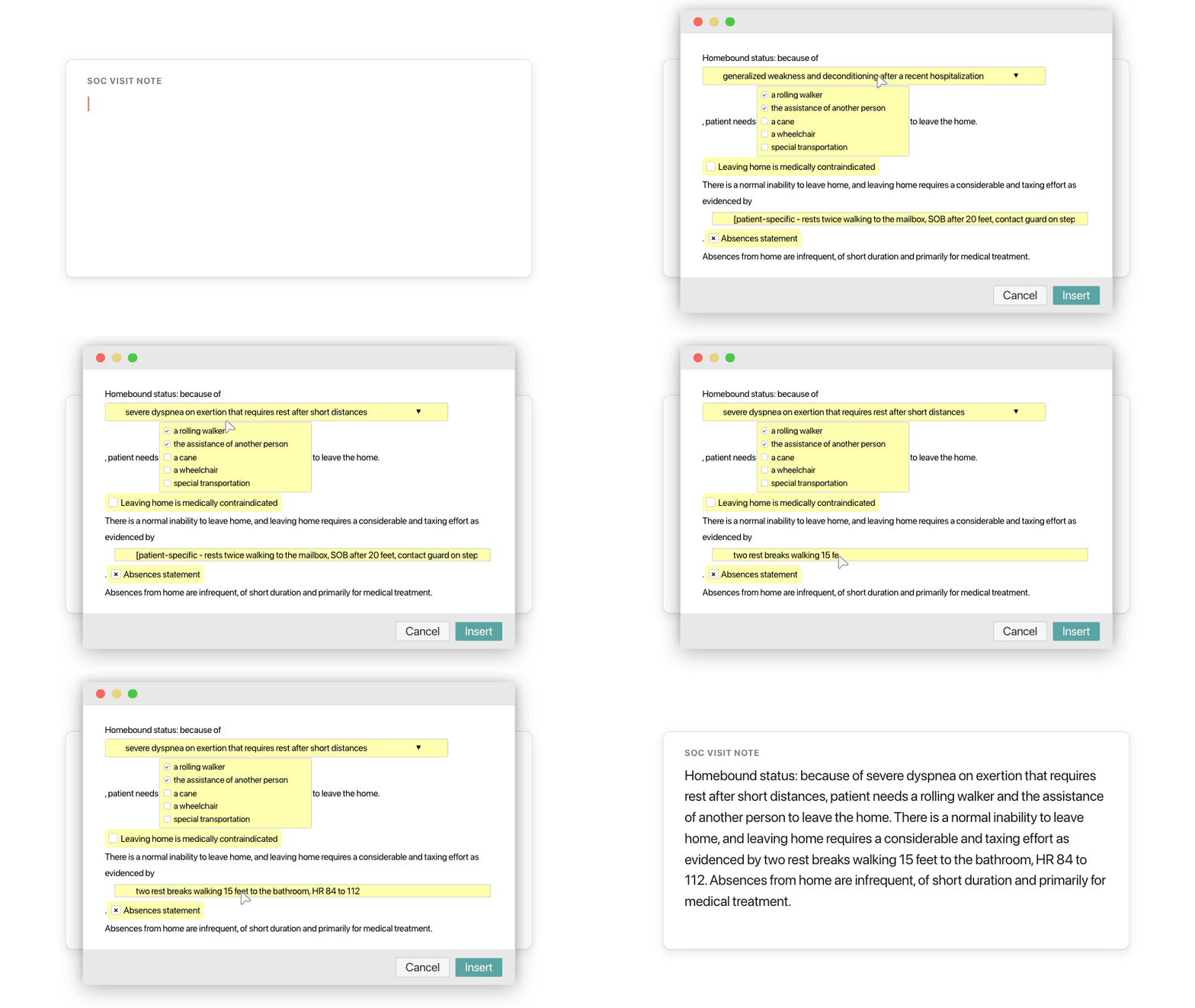
Typing /homebound opens the Text Blaze pop-up, the condition menu changes to severe dyspnea on exertion, the evidence after "as evidenced by" is typed over the placeholder, and Insert places the homebound statement in the visit note

Type /homebound. Pick the reason. Insert.

  1. Add the packThe button opens the pack's page on the Text Blaze marketplace. Add the pack in one click (sign up for a free account if you do not have one) and the templates are yours, ready to edit and use anywhere.
  2. Type /homebound where you chartWith Text Blaze installed (the Chrome extension, or the Windows or Mac app), type /homebound in your EHR's homebound or narrative field, or in a Google Doc you draft in. A pop-up opens with the condition, the device or help needed and the evidence field. At a start of care, /socnar carries a shorter homebound paragraph inside the full narrative.
  3. Fill in, insert, editPick the condition, type what you measured today after "as evidenced by", insert. The criteria sentences stay the same and the evidence is new at every visit. It lands as text you can still edit.
  4. Then make one of your ownCreate a snippet of sentences or paragraphs you type often. Give it a keyboard shortcut. Type the shortcut anywhere and the text appears. Congratulations! You just saved yourself a few seconds.

What is Text Blaze?

Text Blaze is a free Chrome extension, with Windows and Mac apps, that turns the text you type again and again into templates you insert with a shortcut. Type /socnar and the whole start of care narrative appears where your cursor is, in any app you type in on a computer.

An OASIS start of care can mean an hour or more of typing, often after the last visit. If you keep your phrases in a Word or Google Doc and paste from it, this is that document, one shortcut away inside the chart. Templates can hold text fields, drop-down menus, dates and toggles, so each narrative comes out complete and specific to this patient and this visit.

Works where you chart on a computer

The web versions of WellSky, Axxess and Alora, Google Docs, Gmail and Outlook. No integration to set up. On an agency laptop, IT may need to approve the extension first. Phone and tablet charting apps are the exception.

This visit's evidence, not last visit's

Every homebound sentence ends in a field for what you saw today, and the skilled need is chosen for this patient. A paragraph copied forward with nothing new in it is what reviewers notice.

Your agency's wording, saved once

Change the menus once to the phrases your agency uses and every narrative starts from them. One person can set the templates and share the folder with the team. Sharing limits are on the plans page.

Free forever

/soclegal and any snippet you save yourself without form fields are free forever. The nine snippets with form fields can be tested on the free plan and need Pro, $2.99 a month billed yearly, for day-to-day use. "Is the pack free?" below has the details.

Works in WellSky (web)Axxess (web)Alora (web)GmailOutlook on the webGoogle Docs

Template insertion is done locally. PHI and other sensitive information never leaves your computer.

What is an OASIS-E cheat sheet?

An OASIS-E cheat sheet is a quick reference home health clinicians keep beside the assessment: the visit timepoints and their deadlines, the items that take longest to answer, and the wording the narrative needs, such as homebound status and skilled need. Most are printable PDFs. This one is a set of phrases you insert as you chart.

What a typical OASIS-E cheat sheet covers:

  • Timepoints and deadlines: the start of care assessment is completed within 5 days of the start of care, a resumption of care within 48 hours of the patient's return home after an inpatient stay of 24 hours or more (for a reason other than diagnostic tests), and a recertification in the last 5 days of every 60-day period.
  • The items that slow you down: functional items such as bathing, dressing, transfers and ambulation (M1810 to M1860 and the GG items), cognition, and the drug regimen review and medication items (M2001, M2020).
  • Homebound status: the two Medicare criteria and the patient-specific evidence a reviewer looks for.
  • Skilled need: why the patient needs a nurse or a therapist and not only a caregiver.
  • Face-to-face encounter: the date, the practitioner and how the encounter relates to the primary reason for home health.

A printed cheat sheet tells you what to write. You still type it, at the patient's kitchen table or at home after the last visit. This pack keeps the same reference at your keyboard: type a shortcut and the sentence is in the chart, with form fields for what is specific to this patient.

It covers the narrative, not the scoring. Score every item from the current OASIS guidance manual, and make sure what you write matches the score you chose.

What makes good homebound and skilled-need wording?

Good homebound wording names both Medicare criteria and proves them with this patient's details: the device or help needed to leave home, and what leaving costs the patient, measured. Good skilled-need wording names what only a nurse or therapist can do at this visit. Fixed sentences carry the criteria, and the evidence is written fresh each time.

  • Criterion one, the help needed. Because of illness or injury, the patient needs a supportive device, special transportation or another person's help to leave home, or leaving home is medically contraindicated.
  • Criterion two, the cost of leaving. There is a normal inability to leave home, and leaving home takes a considerable and taxing effort. Both halves have to be there.
  • Evidence you measured. "Unable to walk 10 feet to the car without two rest breaks, HR 88 to 118" is evidence. "Homebound due to weakness" is a conclusion. Distance, rest breaks, the amount of assistance and vital signs on exertion are what reviewers read for.
  • Absences described. Absences from home are infrequent or short, or for medical care. Religious services and adult day care do not by themselves end homebound status.
  • A skilled need tied to the condition. Observation and assessment, teaching, management and evaluation of the care plan, or a procedure, named for this patient's diagnosis and this visit's findings.
  • Written at this visit. A homebound paragraph carried forward unchanged from note to note reads as cloned, even when the patient still qualifies.

The fixed part and the fresh part

The criteria wording barely changes from patient to patient, which is why so many clinicians keep it in a document of phrases and paste it. The evidence changes every visit. The pack splits the two: the criteria sentences are typed for you, and the field after "as evidenced by" is left for what you saw. /taxing is the shortest version: one sentence, one form field for your evidence. To move your own phrases over, paste each one into a new snippet and give it a shortcut.

The wording follows the Medicare homebound criteria. Check it against your agency's policies and your MAC's guidance, and change it once where they differ.

How this template helps

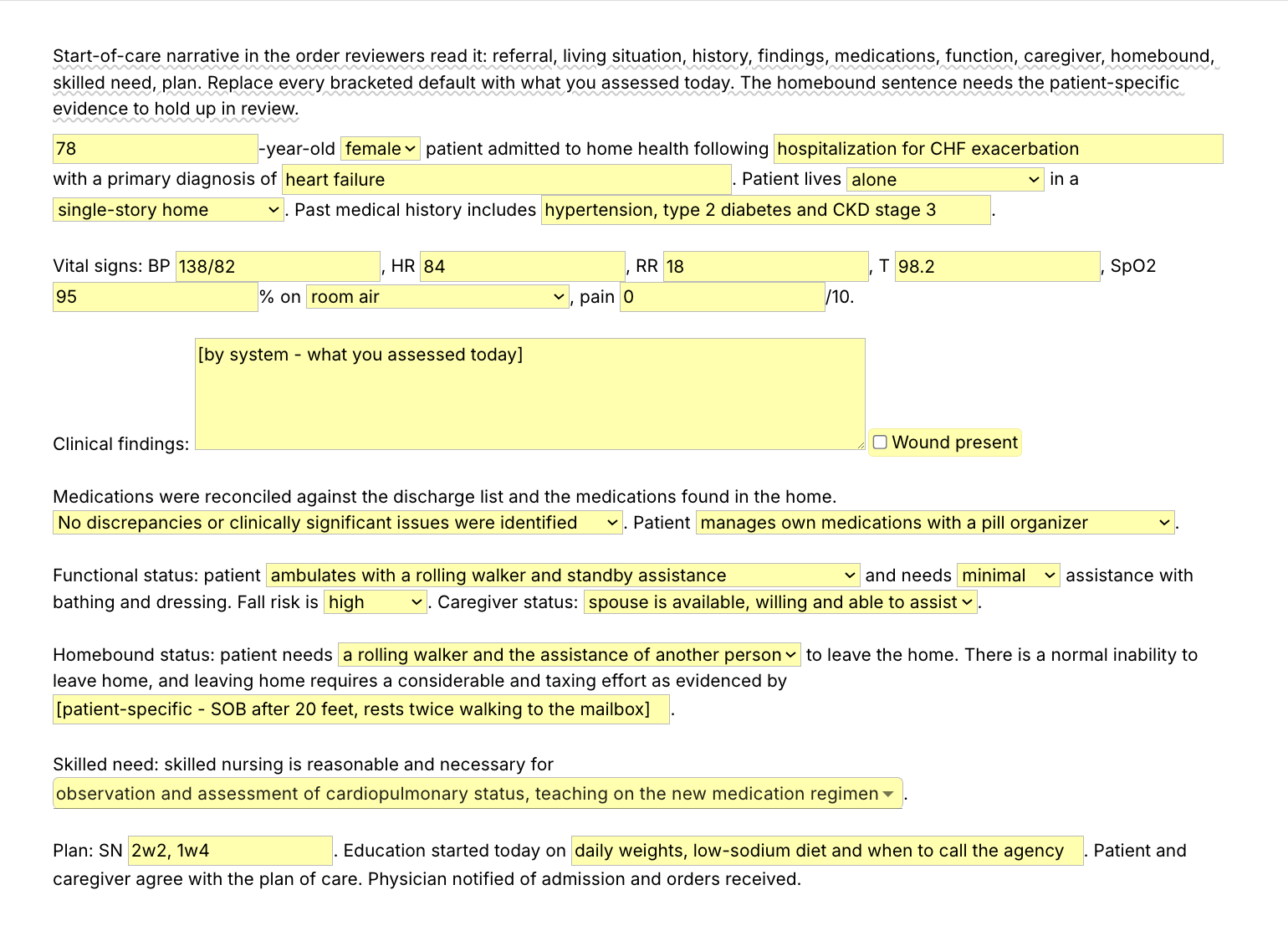
The /socnar snippet is an OASIS start of care narrative as a Text Blaze pop-up: referral, living situation, history, vital signs, findings, medications, function, caregiver, homebound status, skilled need and plan, in the usual order of a start of care narrative. You pick from menus and type what you assessed. Four more templates and five shorter snippets cover the rest.

Inside the pop-up

The first screenshot at the top of the page is the whole form. Menus hold the choices you make at most admissions: who the patient lives with and where, room air or oxygen, how the patient walks, how much help bathing and dressing take, fall risk, the caregiver, the device or help needed to leave home, and the skilled needs (choose several). Text fields hold the rest: age, the event that led to home health, the diagnosis, vital signs and your findings by system. A toggle adds an integumentary line when there is a wound. The guidance note at the top shows while you write and is never inserted.

Here is sample OASIS documentation from /socnar, filled in for a fictional patient (the middle of the narrative):

Medications were reconciled against the discharge list and the medications found in the home. Discrepancies were identified and reported to the physician today. Patient needs reminders to take medications on time.

Functional status: patient ambulates with a rolling walker and standby assistance and needs moderate assistance with bathing and dressing. Fall risk is high. Caregiver status: spouse is available, willing and able to assist.

Homebound status: patient needs a rolling walker and the assistance of another person to leave the home. There is a normal inability to leave home, and leaving home requires a considerable and taxing effort as evidenced by dyspnea after 15 feet, HR 92 to 118, and a 5-minute seated recovery.

For this patient, three menus were changed (medication reconciliation, medication management and the help needed with bathing and dressing). The age, diagnosis, vital signs, findings, frequency, teaching and the evidence after "as evidenced by" were typed in. /socnar is written for a start of care. At a resumption of care, edit its first sentence, or save a copy as your own ROC snippet.

The other four templates

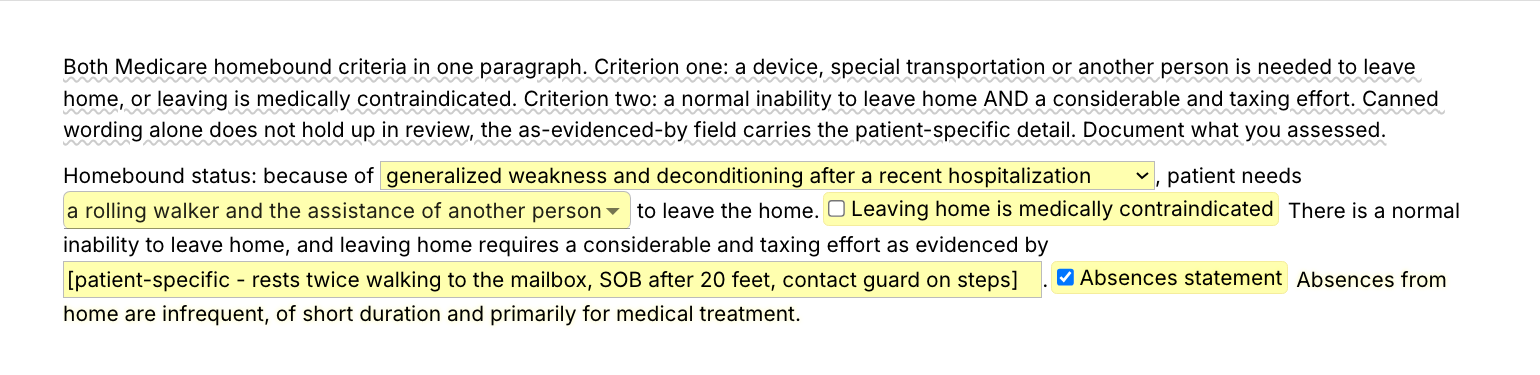
  • /homebound, both homebound criteria in one paragraph: the condition (six common reasons in a menu), the devices or help needed (choose several), a toggle for when leaving home is medically contraindicated, the evidence field and the absences sentence. Use it at a visit where homebound status needs its own entry.
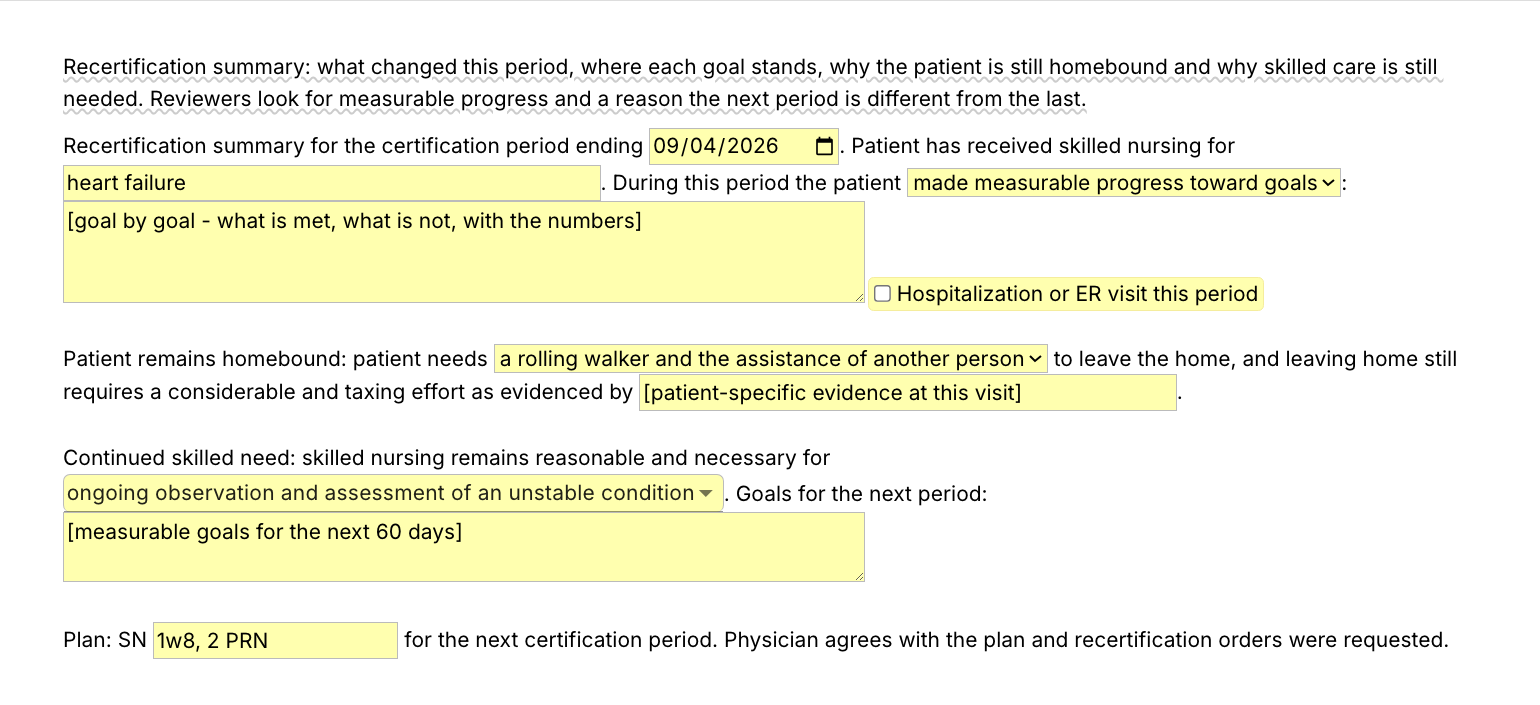
  • /recert, the recertification (60-day) summary: the end of the certification period, progress toward goals (measurable, partial or a decline) with the numbers goal by goal, a toggle for a hospitalization or ER visit, continued homebound status, continued skilled need, goals for the next period and the frequency.
  • /mitem, narrative phrases for the OASIS-E items that slow everyone down: ambulation, transfers, bathing and dressing, cognition and medications, each keyed to its OASIS-E item numbers and switched on when you need it. These are your narrative lines, not the item text, and they do not score anything. When CMS updates the data set, check the item numbers against the current guidance manual.
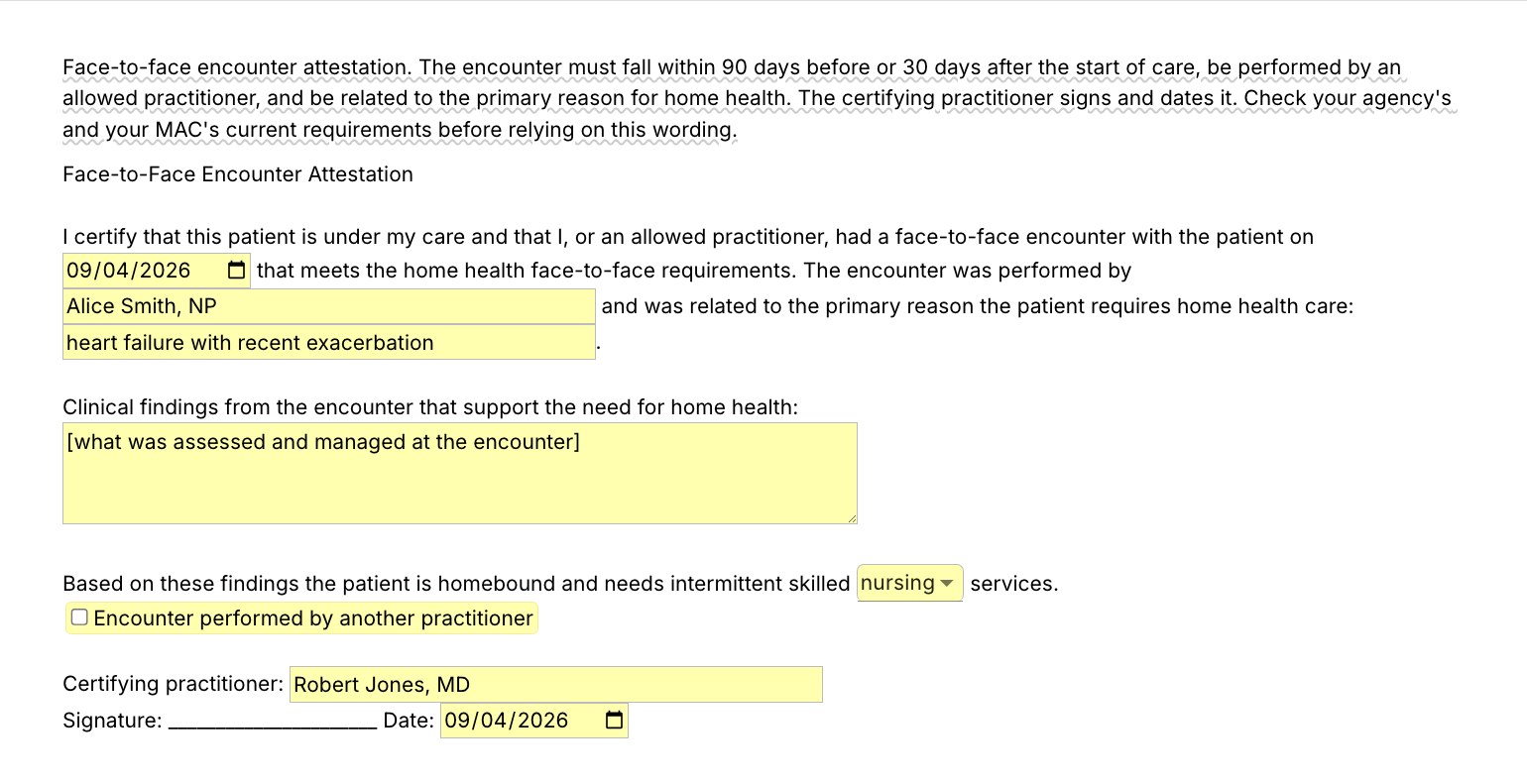
  • /f2f, the face-to-face encounter attestation. It is written in the certifying practitioner's voice. The agency (usually intake or the office) drafts it, and the practitioner reviews, completes, dates and signs it, with the findings taken from the practitioner's own encounter record. It holds the encounter date, who performed it, the related diagnosis, the clinical findings, the services needed and the signature line. The encounter must fall within 90 days before or 30 days after the start of care.

Shorter snippets for the sentences you type most

  • /taxing, the criterion two homebound sentence, with one field for the evidence. A good first one to change into your own words.
  • /needsaid, the criterion one sentence, with a menu for the device or help needed.
  • /snneed, the skilled nursing need statement, with one field for the condition you are assessing.
  • /snfreq, the visit frequency order line, with PRN visits and the interventions the visits cover.
  • /soclegal, the start of care consents and notices paragraph: consents, privacy notices, rights and responsibilities, advance directives, payer coverage, the emergency plan and the agency's contact information left in the home. It has no fields, so it works on the free plan without limit.

The same structure at every admission, this patient's findings in every section: consistent narratives with specific evidence are what a QA nurse or a reviewer reads fastest.

Text Blaze helps me finish my paperwork while I'm still sitting with a patient.

Stephanie Yakobina

Add the pack to a free Text Blaze account and type /socnar at your next start of care. For the homebound sentence alone, type /taxing and write what you saw after "as evidenced by".

Copy the template for free

Free forever. Works in any web-based EHR or app. No integration required.

Questions home health clinicians ask

Do I need Text Blaze to use this template?

Yes. The templates are Text Blaze snippets. The free plan is enough to add all 10, to use the consents paragraph and any snippet you make that has no form fields as often as you like, and to test the templates with form fields. Text Blaze is a free Chrome extension, with Windows and Mac apps as well.

Does it work in my EHR?

Yes. Text Blaze works in your EHR, your email and any other app you use on a computer: the web versions of WellSky, Axxess and Alora among others, Gmail, Outlook and Google Docs. If your EHR opens in Chrome or Microsoft Edge, or runs as a Windows or Mac program, Text Blaze works there. There is nothing to integrate: you type the shortcut in the field where you would have typed the narrative. It does not run inside phone or tablet charting apps, so a visit charted on a tablet stays hand-typed there. That includes the Homecare Homebase field app, which runs on Android phones and tablets.

To check yours, add the pack and type /soclegal in a note field on your computer. If the paragraph appears, the rest will too. On an agency computer, IT may need to approve the Chrome extension or the Windows app before you can install it.

My EHR already has templates. Why this pack?

Keep them if they work for you. The pack is for the writing those templates leave to you: the narrative, the homebound evidence, the document of phrases you copy from. It works the same in a second system or a Google Doc, and it comes with you if your agency changes EHRs.

Will my notes look cloned?

Not if the evidence is this visit's. The criteria sentences repeat because the criteria repeat. What makes a note read as cloned is the same evidence and the same findings carried forward. Every homebound sentence in the pack ends in a field for what you saw today, every skilled-need sentence asks you to pick or type the reason for this patient, and /socnar leaves the findings by system to you. Read what you inserted before you sign and change anything that differed.

Is my patient's information stored anywhere?

Text Blaze snippets hold your template and your defaults, not your patient records. Template insertion is done locally: what you type into the pop-up's fields goes into the page you are on and is not saved, synced or logged by Text Blaze after you insert.

BAA is available upon request. Read our HIPAA guide.

Is the pack free?

The pack is free to add, and its 10 snippets fit the free plan. /soclegal, the consents paragraph, is free to use forever, and so is any snippet you save yourself without form fields. On the free plan you can test the nine snippets with form fields (the five templates, /taxing, /needsaid, /snneed and /snfreq) to see how they work. Using them day to day needs Pro, $2.99 a month billed yearly ($3.49 billed monthly). The plans page lists what each plan includes.

Can I change the template?

Yes. Everything is editable: the menu options, the defaults, the sentence frames and the order. Add the conditions your agency sees most to the /homebound menu, put your agency's own consents in /soclegal, or change "skilled nursing" to physical therapy in /socnar and /recert if you open therapy-only cases. Change it once and it stays changed.

Does the template guarantee reimbursement?

No. Coverage depends on the patient meeting the criteria and on the record showing it. The pack gives you the wording in the usual order and leaves room for the evidence. It cannot supply the evidence, and the wording should be checked against your agency's policies.

Can I use it on Windows or Mac?

Yes. Text Blaze runs as a Chrome extension (it installs in Microsoft Edge too) and as Windows and Mac apps, so the shortcuts work in web-based EHRs and in desktop apps alike, with the same snippets on every computer you sign in on. There is no iPad or phone app, so a note written in a phone or tablet charting app stays hand-typed.

Your OASIS narrative in minutes, not an evening.

Add the free OASIS-E pack, an OASIS cheat sheet that types itself, and set the menus to your agency's wording once. The start of care narrative takes minutes, and /taxing puts the taxing-effort sentence into any note with the evidence left for you to write.

Copy the template for free

Free forever. Works in any web-based EHR or app. No integration required.